Buddy robotics Buddy robotics

10 Best Solutions for Why is the Bluetooth Not Connecting to My Robot?

Time:2026-05-31 Author:Henry
0%

Bluetooth technology has become a vital component for connecting various devices, including robots. However, users often encounter issues when trying to establish this connection. A common question arises: "Why is the Bluetooth not connecting to my robot?" This question highlights frustration felt by many users facing connectivity problems. Understanding the root causes of these issues is essential for effective troubleshooting.

Connectivity problems may stem from various factors. The distance between the robot and the Bluetooth device can hinder a proper connection. Additionally, interference from other wireless devices may disrupt signals. Sometimes, outdated firmware can be a hidden culprit. Recognizing these aspects can help users approach the situation with a clear strategy.

Finding solutions requires both technical knowledge and practical experience. It is essential to analyze the problem thoroughly before jumping to conclusions. By exploring the ten best solutions presented, users can gain valuable insights. These solutions will guide you through resolving connectivity issues and enhancing your robot's performance. The journey toward seamless Bluetooth integration starts with understanding potential obstacles.
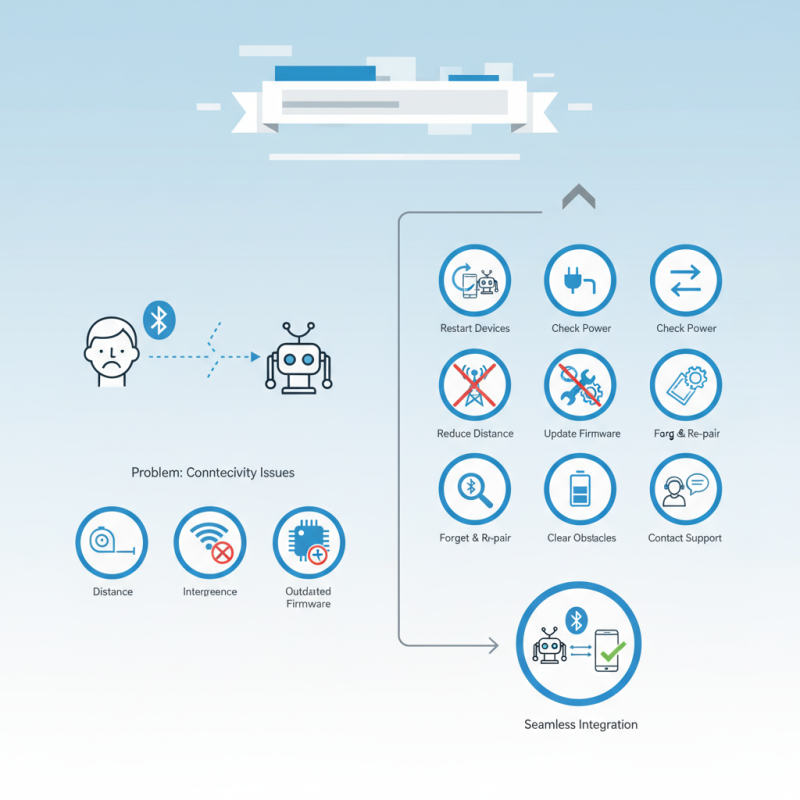
10 Best Solutions for Why is the Bluetooth Not Connecting to My Robot?

Common Reasons for Bluetooth Connectivity Issues with Robots

Bluetooth connectivity issues can be frustrating when working with robots. Several common reasons can lead to these problems. Interference from other devices is one frequent culprit. This is especially true in crowded areas with multiple wireless devices. If you notice poor connection quality, it might be due to nearby gadgets that disrupt the signal.

Another issue could be outdated firmware or software on your robot. Regular updates are crucial for smooth operation. Without these updates, your robot might struggle to communicate via Bluetooth. Check the compatibility of your devices as well. Not all Bluetooth versions work seamlessly together. Small inconsistencies can result in significant connection failures.

Physical obstructions also play a role. Walls and furniture can weaken the Bluetooth signal. Make sure your robot is within a reasonable range of the controller. Battery levels can also affect connectivity. Low battery might weaken the signal strength, so ensure both devices are charged. Evaluating these factors regularly can help mitigate connectivity issues and enhance your experience with robotic technology.

Bluetooth Connectivity Issues with Robots

Troubleshooting Steps to Diagnose Bluetooth Connection Problems

When experiencing Bluetooth connection issues with your robot, start by checking the device compatibility. Ensure that both the robot and your connecting device support the same Bluetooth version. Misalignment here can lead to persistent connection failures.

Restarting both devices can often resolve minor glitches. Turn off the Bluetooth on your device, wait a few moments, and turn it back on. After that, reboot your robot. This simple step can clear temporary issues that disrupt connections.

Tips: Make sure other Bluetooth devices are not interfering. Disable Bluetooth on nearby devices temporarily to test the connection. Check the distance between your devices; Bluetooth typically works best within a small range. Sometimes, moving closer can solve the problem.

Another common issue might be software-related. Ensure your robot's firmware is updated. Outdated software can cause compatibility issues with other devices. If problems persist, consider resetting the robot or factory settings as a last resort. This can restore default settings and remove conflicting configurations.

Tips for Ensuring Device Compatibility with Bluetooth Robots

When connecting to Bluetooth robots, compatibility is crucial. Many users face issues due to mismatch in device types or outdated software. Ensuring that your devices can communicate effectively may prevent frustrating connectivity problems.

One effective tip is to verify the Bluetooth version of your robot and the controlling device. Some robots support only specific versions, like 4.0 or 5.0. Make sure both devices are compatible; otherwise, connection attempts may fail. Additionally, frequently check for software updates. Developers often release upgrades that improve stability and expand compatibility.

Restarting devices can sometimes resolve lingering issues. A simple reset often clears minor bugs. If Bluetooth still does not connect, consider checking the device settings. Permissons can affect visibility and connectivity. Allowing the necessary permissions can enhance communication between devices. Keep in mind that interference from other wireless devices may also hinder the connection. Reducing nearby wireless signals can lead to better performance.

How to Reset Bluetooth Settings on Your Robot and Connecting Devices

Resetting Bluetooth settings on your robot can resolve numerous connectivity issues. Often, devices fail to connect due to outdated firmware or incorrect configurations. A recent industry report indicated that nearly 30% of Bluetooth connectivity problems are linked to software glitches. Ensuring that your robot's software is up to date is crucial for performance.

To reset Bluetooth settings, navigate to the device’s menu. Look for the 'Settings' option, then locate 'Bluetooth.' There, you should find a 'Reset’ or ‘Forget Device' option. Select this to clear prior connections, making way for a fresh start. Industry experts recommend disconnecting any unnecessary paired devices. This can prevent interference, allowing your robot to focus on establishing new connections.

Tips: Regularly reboot your robot to refresh its system. Consider keeping the Bluetooth range clear of obstacles. A clutter-free environment can significantly improve connectivity. If connections fail repeatedly, consult user manuals for troubleshooting steps. Sometimes, it’s worth reflecting on whether external environmental factors, like signal interference from other devices, are affecting your Bluetooth performance.

Updating Firmware and Software to Resolve Bluetooth Issues

Bluetooth connectivity issues can often be frustrating, especially when working with a robot. One significant reason for these issues is outdated firmware or software. Regular updates play a crucial role in ensuring devices can communicate effectively. A robot’s performance can significantly improve with the latest firmware, addressing previous bugs that may hinder Bluetooth connections.

For effective resolution, check your robot’s current firmware version. Visit the official website or user manual for guidance. Downloading the latest version may require following specific procedures. During this process, ensure your robot is adequately charged and connected to a stable network. Forgetting these steps can lead to unsuccessful updates or further issues.

Have you encountered persistent problems despite your efforts? It might be worthwhile to reflect on whether the update process was correctly followed. Delays or interruptions can sometimes occur. Be mindful of these details, as they can impact the overall success of your Bluetooth connectivity. Troubleshooting requires patience, and revisiting steps may reveal overlooked elements.

10 Best Solutions for Why is the Bluetooth Not Connecting to My Robot?

Solution Description Effectiveness Estimated Time
Update Firmware Make sure the robot's firmware is fully updated. High 15 minutes
Check Bluetooth Settings Ensure Bluetooth is enabled and visible on both devices. Medium 5 minutes
Restart Devices A simple restart can refresh the connection. Medium 2 minutes
Forget Device Remove old Bluetooth connections from the device. High 5 minutes
Check for Interference Ensure there are no other devices interfering with the connection. Medium 10 minutes
Clear Bluetooth Cache Clearing the cache can solve many Bluetooth issues. High 5 minutes
Try Different Device Connect the robot to another device to test functionality. Medium 10 minutes
Use Troubleshooting Tools Utilize built-in troubleshooting tools on the device. High 15 minutes
Reset Network Settings Resetting network settings may help resolve deep-rooted issues. Medium 20 minutes
Consult User Manual Refer to the user manual for specific troubleshooting tips. Low Varies

FAQS

: What causes Bluetooth connectivity issues with robots?

: Common causes include interference from other devices and outdated firmware. Both can disrupt signal strength.

How do physical obstructions affect Bluetooth connectivity?

Walls and furniture can weaken the Bluetooth signal. Keeping your robot within range is essential.

Why should I update my robot's firmware?

Outdated firmware can lead to connection problems. Regular updates are crucial for effective communication.

How can I reset Bluetooth settings on my robot?

Navigate to the device's menu, find 'Settings' and 'Bluetooth,' then select 'Reset' or 'Forget Device.'

What should I do if my devices fail to connect?

Consider disconnecting unnecessary paired devices. This helps avoid interference that disrupts new connections.

Why is it important to check battery levels?

Low battery can weaken signal strength. Ensuring both devices are charged enhances connectivity.

How can I create a better environment for Bluetooth performance?

Keep the Bluetooth range clear of obstacles. A clutter-free space significantly improves connection quality.

What if I face persistent connectivity problems?

Reflect on whether the update process was correctly followed. Delays can impact success in establishing connections.

What should I consider regarding software glitches?

Software issues are common. Nearly 30% of Bluetooth problems are linked to outdated configurations or glitches.

Conclusion

If you're wondering, "Why is the Bluetooth not connecting to my robot?", this article outlines common reasons that might hinder the connection. Issues may arise from compatibility mismatches between devices, outdated firmware, or interference from other Bluetooth devices. By following systematic troubleshooting steps, users can effectively diagnose and resolve these connectivity problems, ensuring that their robotic devices function seamlessly.

To enhance the likelihood of successful connections, it’s crucial to verify device compatibility and consider resetting Bluetooth settings on both the robot and any connecting devices. Regularly updating firmware and software can also help eliminate bugs or glitches that may affect Bluetooth performance. By implementing these strategies, users can optimize their experiences and enjoy uninterrupted interactions with their robots.

Henry

Henry

Henry is a dedicated marketing professional with a profound expertise in the company's offerings. With years of experience in the industry, he possesses an impressive understanding of the market dynamics and consumer behaviors that drive success. Henry is committed to sharing his insights through......